

Oops! Something went wrong with the browser.
Please try again. If the issue persists, contact support@logicimtech.com and include error code .
Missing connections on the XLGL panel
Company connections saved on XLGL disappeared
A normal XLGL connection panel that you can get from XLGL > Connect should look like this.
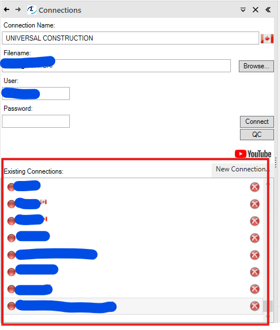
If the connections suddenly disappeared, please check if:
- You are using a new computer.
- The computer that you are using has been factory reset.
If you have not experienced any of the above, there might be some issues with the config file.
- Please open File Explorer and go to C:\Users\<Your User Name>\AppData\Roaming\EasyQuery
- Rename config.xml.bak to config.xml

Related articles
No related articles found
Edited: Wednesday, August 12, 2026
Was this article helpful?
Thank you! Your feedback matters.
We'd love to hear your thoughts! Please provide a comment before submitting.