

Oops! Something went wrong with the browser.
Please try again. If the issue persists, contact support@logicimtech.com and include error code .
Should I renew my Logicim XLGL Update subscription before moving to SaaS?
Yes. Renewing your Logicim XLGL Update subscription ensures continued access to updates, support, and a smooth transition to the SaaS model.
Why renewal is recommended
- Uninterrupted Access – Renewal helps maintain access to the latest available Logicim XLGL version during the transition to SaaS.
- Continuous Support – You continue receiving support throughout the transition period.
- No Lost Value – When you move to the Logicim XLGL Platform Plan (SaaS), any remaining time on an active update's subscription converts into a coupon that can be applied toward the Platform Plan. This ensures previous investment is carried forward.
How the transition works
When serial-number customers move to the Logicim XLGL Platform Plan (SaaS), renewal value does not go to waste. Remaining subscription time converts into a credit coupon that applies to the SaaS subscription, allowing customers to transition without losing value.
How to move from Serial Number (old licensing) to the new Platform Plan
Option 1:
- Navigate to the Logicim XLGL tab and select Renew update subscription.
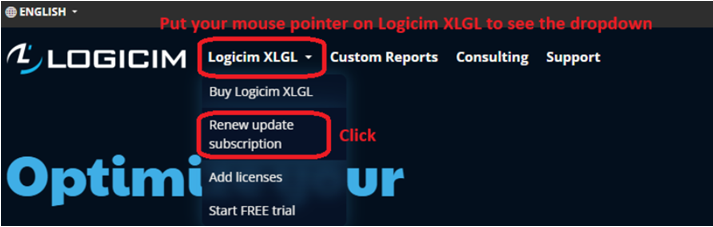
- From the available frequency (Monthly or Yearly), choose your preferred Logicim Reporting Platform.
- Once you click the Renew button, you will be redirected to the Shopping Cart, where you can continue your purchase to complete the conversion.
Option 2:
- Navigate to your Profile, then select Serial numbers tab and click the Renew button.
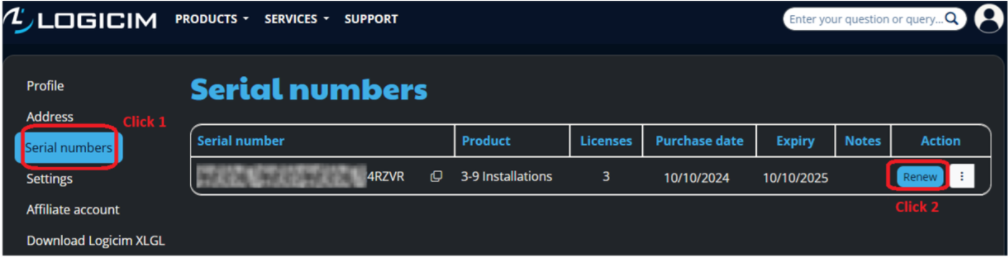
- You will be redirected to the Renew page, where you can choose your preferred Logicim Reporting Platform, and proceed with the purchase. During the purchase, the system will automatically apply a calculated discount based on the remaining time before your serial number expires.
After the purchase
Your Serial Number license will be converted to the new Logicim XLGL Platform Plan (SaaS), which will be visible in your Profile under the Logicim XLGL Platform Plans tab.
Related articles
No related articles found
Edited: Friday, June 05, 2026
Was this article helpful?
Thank you! Your feedback matters.
We'd love to hear your thoughts! Please provide a comment before submitting.