

Oops! Something went wrong with the browser.
Please try again. If the issue persists, contact support@logicimtech.com and include error code .
How can I renew my Logicim XLGL Update subscription?
Renewing a Logicim XLGL Update Subscription manually applies only to customers using traditional serial number licensing.
If you are already using the new Logicim XLGL Platform Plan (SaaS), renewal happens automatically based on your selected monthly or yearly plan.
From Profile page
- Sign in to your Logicim account.
- Click Serial Numbers
- Click Renew

From Renew Update Subscription page
You can also renew your Update Subscription by:
- Clicking Products in the top menu
- Selecting Renew update subscription (make sure you are signed in)
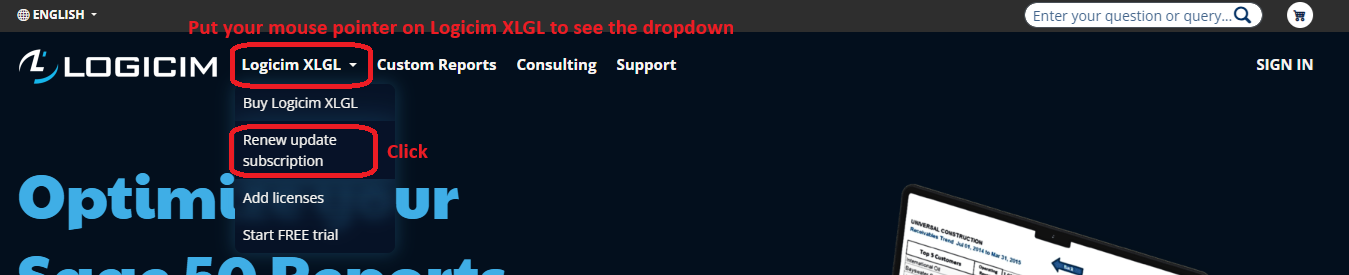
You will be redirected to the Renew page.
From there, you can choose to convert your traditional serial number license to your preferred Logicim XLGL Platform Plan (SaaS) and proceed with the purchase.
During the purchase process, the system automatically applies a discount based on:
- The remaining time left before your serial number expires
- The number of licenses included on your serial number
No coupon will be applied if your serial number has already expired.
After the Purchase
After the purchase is completed:
- Your renewal is successful and your subscription becomes active
- Your serial number license will be converted to the new Logicim XLGL Platform Plan (SaaS)
- Your new subscription will appear in your Profile under the Logicim XLGL Platform Plans tab
- Your renewal will become automatic moving forward
- You will continue receiving access to the latest available versions, improvements, compatibility updates, and ready-to-use Reports
This means you no longer need to manage serial numbers or manually renew your Update Subscription each year.
More Details
If you would like more information about the conversion process, follow the step-by-step guide on how to convert your traditional serial number to the new Logicim XLGL Platform Plan (SaaS).
Related articles
Edited: Saturday, April 18, 2026
Was this article helpful?
Thank you! Your feedback matters.