

Oops! Something went wrong with the browser.
Please try again. If the issue persists, contact support@logicimtech.com and include error code .
Where can I find my serial numbers in my Logicim account?
Traditional Licensing - Using Serial Numbers
Traditional serial numbers apply only to customers using the previous Logicim XLGL licensing model.
If you are using the new Logicim XLGL Platform Plan (SaaS), you will not have a serial number because access is managed through your Logicim account and Plan Code instead.
This article is intended only for customers using traditional licensing with serial numbers.
What is a serial number?
Your Logicim XLGL serial number is a unique identifier that grants access to your software.
It is essential for activation and license management, ensuring an optimized Sage 50 reporting experience with clarity and efficiency.
Sign in to you Logicim account
- Visit https://www.logicimtech.com
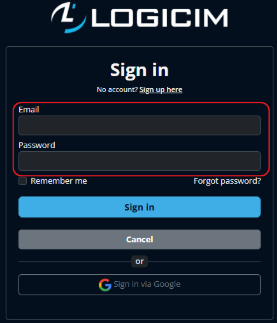
- Sign in to your Logicim account
- Click Sign in on the right side of the top menu.
- Enter your username (email) and password to sign in.
Locate your Serial numbers
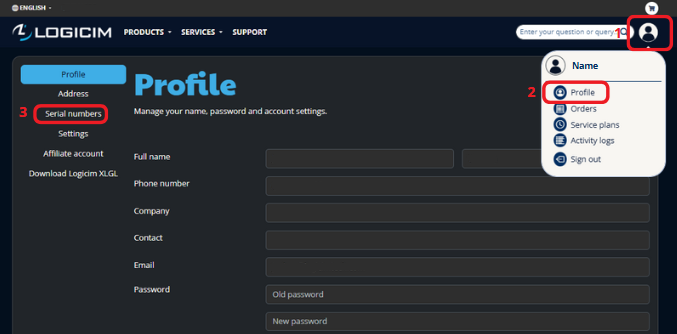
1. If you have only one serial number:
- Click the profile icon in the top-right menu.
- Click Profile from the dropdown menu.
- Select the Serial numbers section from the left-hand menu.
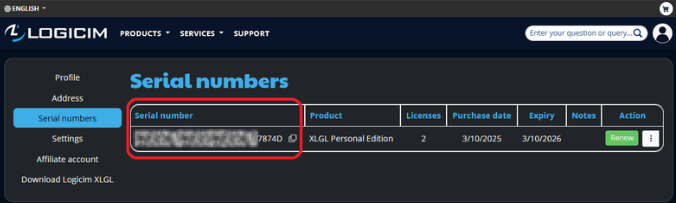
Your serial number appears on a table along with your product details.
2. If you have multiple serial numbers:
- Navigate to the Renew update subscription page under the Products section.
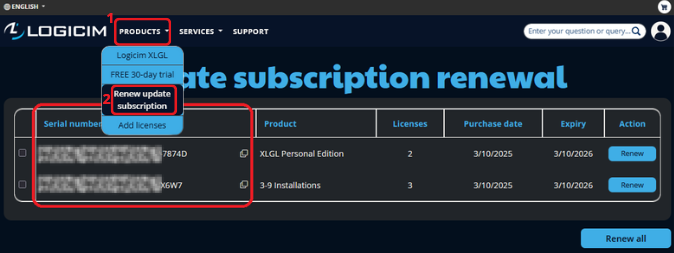
- Alternatively, access the Serial numbers section in your Profile.
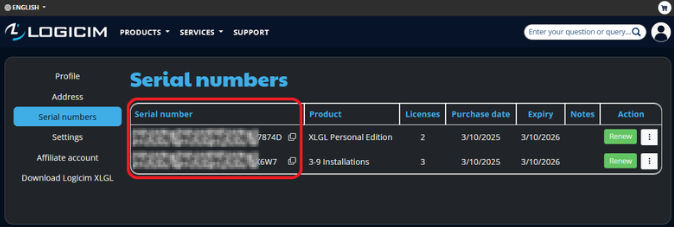
Both pages display all your serial numbers with relevant details.
Related articles
Edited: Monday, April 20, 2026
Was this article helpful?
Thank you! Your feedback matters.