

Oops! Something went wrong with the browser.
Please try again. If the issue persists, contact support@logicimtech.com and include error code .
How can I transfer a Logicim XLGL license from one computer to another?
Deactivating a license
To deactivate a license from a computer before you activate it on another one, you can simply uninstall Logicim XLGL from the old computer, then install it on the new computer.
Installing and activating a license
You can install and activate the license on the new computer by following these steps:
- Download Logicim XLGL software from your online account under Downloads
- Install and activate the software on the new computer
Deactivating a license that is on a computer that you don't have access to
- Login to your Logicim account
- Go to Serial Numbers
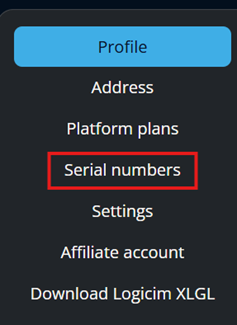
- Click the 3 dots then Manage

- Go to Activations
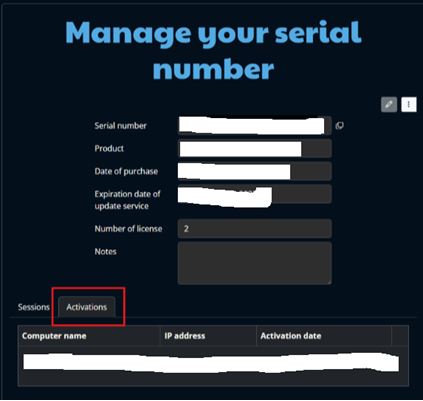
- Click Deactivate
Related articles
Edited: Thursday, September 24, 2026
Was this article helpful?
Thank you! Your feedback matters.
We'd love to hear your thoughts! Please provide a comment before submitting.