

Oops! Something went wrong with the browser.
Please try again. If the issue persists, contact support@logicimtech.com and include error code .
Logicim's Ready-to-Use Sage 50 US Income Statement with Budgets Experimental
Income Statement with Budgets (Experimental)
Introduction
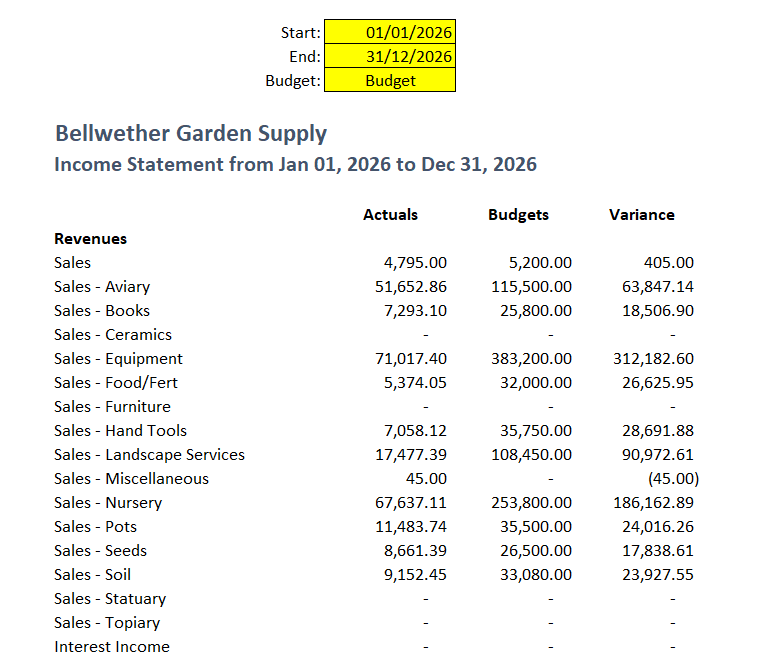
The Income statement with budgets combines actual financial performance with budgeted values for a comprehensive view of your organization's fiscal health. This report allows businesses to track income, expenses, and profitability while comparing actual results against predefined budgets.
Prerequisites
Microsoft Windows 10 Pro, Windows 11 Pro, or Windows terminal server (2012 and above)
Microsoft Office 365
Sage 50 Canadian edition (2014 and above)
Internet connection
What the Report Does
This report provides:
Comparison of actual vs. budget: Displays actual values alongside budgeted figures.
Variance analysis: Highlights discrepancies between actual and budgeted amounts.
Flexible parameters: Allows users to define the reporting period (Start Date and End Date) and select the Budget category for comparison.
How to Use the Report
Open the report workbook.
Go to the Income statement worksheet.
Enter Parameters:
Input the Start Date and End Date in the designated cells.
Select the budget category from the dropdown or list provided
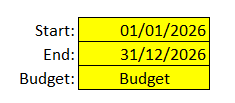
Click the Refresh Data button (if applicable) to update the report.
Review the report:
Customization Options
You may modify the Pivot table to add, modify, or delete a column.
Common Use Cases
Monthly budget reviews to identify over- or under-performing areas.
Quarterly board presentations showcasing financial progress against budget.
Year-end financial analysis for strategic planning.
Troubleshooting
Issue: Report not generating data.
Solution: Ensure all parameters (Start Date, End Date, Budget) are filled correctly
Issue: Variance calculation errors.
Solution: Verify that the formulas in the variance columns are consistent and reference the correct actual and budget cells.
Best practices
Save a backup copy of the Report before making significant changes.
Regularly review the report to track progress and identify trends early.
Customize the report to focus on key performance indicators relevant to your business.
Related articles
References
Related articles
Edited: Monday, August 31, 2026
Was this article helpful?
Thank you! Your feedback matters.