

Oops! Something went wrong with the browser.
Please try again. If the issue persists, contact support@logicimtech.com and include error code .
Logicim's Ready-to-Use Sage 50 US Budget Report
Introduction
The budget Report is used to compare planned budget amounts against actual financial performance. It helps monitor spending, track variances, and support financial planning and decision-making.
Prerequisites
- Sage 50 US edition
- View other prerequisites in the Requirement section here
What the Report Does
This Report summarizes budgeted amounts by month and in total across revenue and account categories. It helps monitor financial performance, compare budget allocations over time, and analyze trends in revenues and expenses.
How to Use the Report
Step 1: Select the month (D9), Year (D10), and the budget (D11).
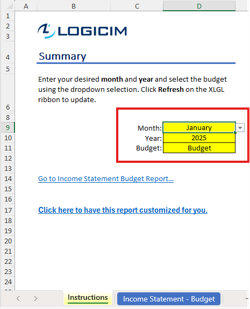
Step 2: Click Refresh on the XLGL ribbon.

Step 3: Click Go to Income Statement Budget Report... to review the Report.
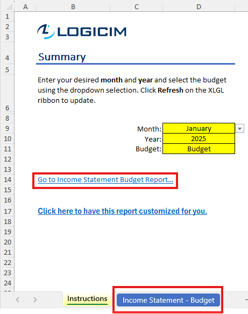
Customization Options
- Adjust the desired year in the Parameters sheet to generate data for a different period.
- You may show all the account IDs by unhiding column B.
Common Use Cases
- Compares budgeted amounts with actual spending to identify variances.
- Tracks and monitors expenses across departments or projects.
- Supports planning and cost control for better financial management.
Troubleshooting
Issue: No data is populated.
Solution: Verify that the input parameters are correct and that the selected date range contains existing records.
FAQs
Q: No value is showing even after a refresh. What should I do?
A: Compare the Report with the Sage 50 built-in financial Report to check if there is data within the selected time period.
Best Practices
- Save a backup copy of the Report before making significant changes.
- Regularly review the Report to track progress and identify trends early.
- Customize the Report to focus on key performance indicators relevant to your business.
References
Related articles
Edited: Thursday, September 24, 2026
Was this article helpful?
Thank you! Your feedback matters.