

Oops! Something went wrong with the browser.
Please try again. If the issue persists, contact support@logicimtech.com and include error code .
Logicim's Ready-to-Use Sage 50 US Customer Standard Invoice Form
Customer Standard Invoice Form
Introduction
A Customer Standard Form Invoice is used to print and issue a standardized billing document that records customer information, purchased goods or services, and payment details.
Prerequisites
Microsoft Windows 10 Pro, Windows 11 Pro, or Windows terminal server (2012 and above)
Microsoft Office 365
Sage 50 Canadian edition (2014 and above)
Internet connection
What the Report Does
This report allows users to generate a Customer Standard Form Invoice by specifying parameters such as Transaction Type, Customer Name, and Reference Number. Based on the selected criteria, the system retrieves the corresponding transaction details and automatically creates the appropriate form. The generated invoice is presented in a printable format, making it suitable for documentation, billing, and record-keeping purposes.
How to Use the Report
In the Instruction tab, there is a yellow-highlighted cell where you can select an option from the dropdown menu.
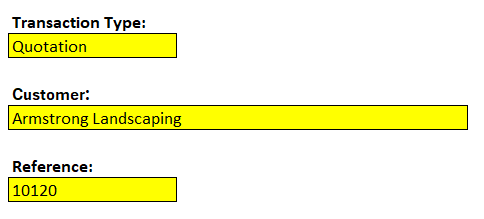
Click Go to Form.

Review the result in Form Tab
A printable invoice is available in print_Form tab.
Customization Options
You may add any text you want in the Form, it will automatically be reflected in prnt_Form sheet.
Common Use Cases
Customer Billing – Used to bill customers for goods or services provided.
Transaction Recording – Used to document customer transactions.
Record Keeping – Used to maintain accurate billing and customer records.
Troubleshooting
Issue: No data is populated.
Solution: Verify that the input parameters are correct. You may validate in Sage 50 if the customer and reference number is expected to have no value.
FAQs
Q: Can I add a text in the form and make it appear in the prnt_Form as well?
A: Yes, any changes made in Form tab will reflect in the prnt_Form
Best Practices
Save a backup copy of the Report before making significant changes.
Regularly review the report to track progress and identify trends early.
Customize the report to focus on key performance indicators relevant to your business.
Related Articles
References
Related articles
Edited: Monday, August 31, 2026
Was this article helpful?
Thank you! Your feedback matters.