

Oops! Something went wrong with the browser.
Please try again. If the issue persists, contact support@logicimtech.com and include error code .
Logicim's Ready-to-Use Sage 50 CA Customer Invoice Log - with Commission
Customer Invoice Log - with Commission
The Customer Invoice Log - with Commission Report lists customer invoices for a selected date range and calculates commission amounts from the rate entered in the workbook.
Prerequisites
What the Report does
The Instructions worksheet provides From, To, and Commission Rate inputs. The Report worksheet shows Customer, Invoice, Date, Salesperson, Sales, Tax, Freight, Total, and Commission columns with customer total rows. The Chart worksheet includes Month to Month Statistic and Customer Invoice Summary views. The hidden Data worksheet calculates Commission from Sales and Instructions!C10 when a salesperson is present.
How to use the Report
Step 1: Enter the date range in Instructions!C8 and Instructions!C9, then enter the commission rate in Instructions!C10.
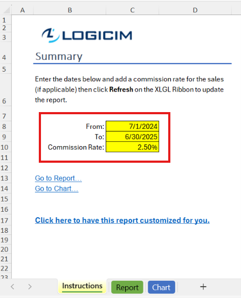
Step 2: Select Refresh on the XLGL ribbon to update the Report.

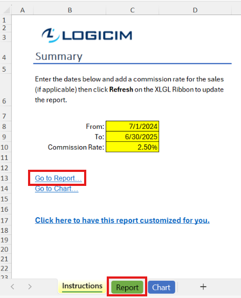
Step 3: Select Go to Report to review the Report worksheet, including customer invoice details and the calculated Commission column.
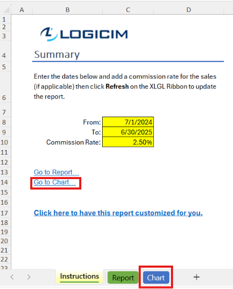
Step 4: Select Go to Chart to review Month to Month Statistic and Customer Invoice Summary views on the Chart worksheet.
Customization options
Adjust the date range in Instructions!C8 and Instructions!C9 and the commission rate in Instructions!C10 before refreshing.
Common use cases
- Review invoices with salesperson, sales, tax, freight, total, and commission amounts.
- Compare customer totals and commission amounts.
- Review monthly invoice activity and customer invoice summaries.
Troubleshooting
Issue: The Report still shows the previous date range.
Solution: Confirm Instructions!C8 and Instructions!C9, then select Refresh.
Issue: Commission amounts are zero or lower than expected.
Solution: Confirm the Commission Rate input in Instructions!C10. The calculation returns 0 when the salesperson field is blank.
FAQs
Q: Which columns appear on the Report worksheet?
A: Customer, Invoice, Date, Salesperson, Sales, Tax, Freight, Total, and Commission.
Q: Where is the commission rate entered?
A: In Instructions!C10 before refreshing.
Q: Are chart views included?
A: Yes. The Chart worksheet includes Month to Month Statistic and Customer Invoice Summary views.
Best practices
- Verify Instructions!C8, Instructions!C9, and Instructions!C10 before refreshing.
- Review customer total rows when checking invoice and commission totals.
- Use the Chart worksheet after refreshing to compare monthly activity and customer summaries.
References
Related articles
Edited: Thursday, September 24, 2026
Was this article helpful?
Thank you! Your feedback matters.